What is the AI Workflow Sprint?

The AI Workflow Sprint is a four-day workshop developed by DSA. It brings people from different parts of the organization together to redesign an internal workflow, build a working AI prototype, and test it with the employees who do the work. What they learn helps them decide: Scale, Iterate, or Stop.
Use it when you have a clear workflow problem, but the people involved have different views of how the work should change. The sprint helps them understand the work together, design how people and AI will interact, and decide whether the approach is worth building.
This guide explains when to use it, what happens during the four days, and what your team needs before starting.
Why do organizations need an AI Workflow Sprint?
An AI tool can improve a task while the workflow around it barely changes.
Imagine using AI to prepare customer proposals. Drafting becomes faster, but every proposal still needs someone to check the figures, confirm availability, and approve the terms. More drafts arrive at the review stage. The reviewers become the new bottleneck.
The business needs proposals delivered sooner. The pilot showed that AI could draft them faster. Those are different results.
To improve the whole workflow, the team needs to look at how the steps connect: which are still useful, how information moves, who makes decisions, and what happens when something goes wrong.
Different people hold different parts of that picture. Employees know the exceptions. Engineers know the technology and systems. Data specialists know the inputs. Business owners know what results the organization needs.
The AI Workflow Sprint brings those people together while there’s still room to change the design. Together, they can make a decision that none of them has enough information to make alone.
When should you run an AI Workflow Sprint?
Run it when a specific workflow needs to change and the team needs to work out whether AI can help—and how.
It is particularly useful when:
- The workflow involves several teams, systems, and handoffs.
- The work involves judgment, exceptions, or know-how that’s hard to explain.
- A pilot improved one task, but overall time, cost, or quality barely moved.
- Business and technical colleagues need to agree on what to build.
- Leadership wants evidence before committing to a build.
- The team is willing to act on a Scale, Iterate, or Stop decision.
You can also start with an AI project that has stalled. The sprint helps the team understand why the solution doesn’t fit the work and what needs to change.
!!! The team needs to be open to what it learns. If the organization will deploy the solution whatever the testing shows, the sprint has little room to change the decision.
When is an AI Workflow Sprint the wrong next step?
The sprint is useful when people need to work through a workflow problem together before anyone can decide what to build. Check these conditions before committing the team’s time.
- The task is simple enough to build directly. One person or team owns it, the rules are predictable, and the inputs and outputs are clear. If everyone agrees on what a good result looks like, a builder and a focused test may be enough.
- The use case is missing or too broad. “Improve work with AI” gives the team too little direction. You need a specific employee, workflow, and problem. Start with AI Problem Framing to choose the opportunity and narrow the scope.
- The solution has already been decided. If leadership will proceed regardless of what employee testing shows, the sprint becomes an approval exercise. Agree first that the findings can lead to a change of direction—or a Stop decision.
- The main problem sits outside the workflow. Unclear ownership, governance, platform design, or enterprise architecture may need decisions the sprint team cannot make. Resolve those decisions with the people responsible before asking the team to design around them.
- The information the AI needs is unavailable. If the data or knowledge is not digitized, accessible, usable, or permitted for this use, the team cannot build a believable prototype. Establish what information can be used and close the critical gaps first.
- The right people cannot take part. You need someone close to the work, someone who understands AI and data, and a Decider with authority. Without that mix, key questions stay unanswered. Assemble the team before scheduling the sprint.
- The experience is customer-facing. If you need to test a product or service with external customers, use an AI Design Sprint. The AI Workflow Sprint focuses on the employees doing the work.
A useful final check is: what is blocking progress? If nobody has built the solution yet, you may be ready to build. If nobody knows what to build because each team sees only part of the workflow, that is a stronger reason to run the sprint.
Who needs to participate?
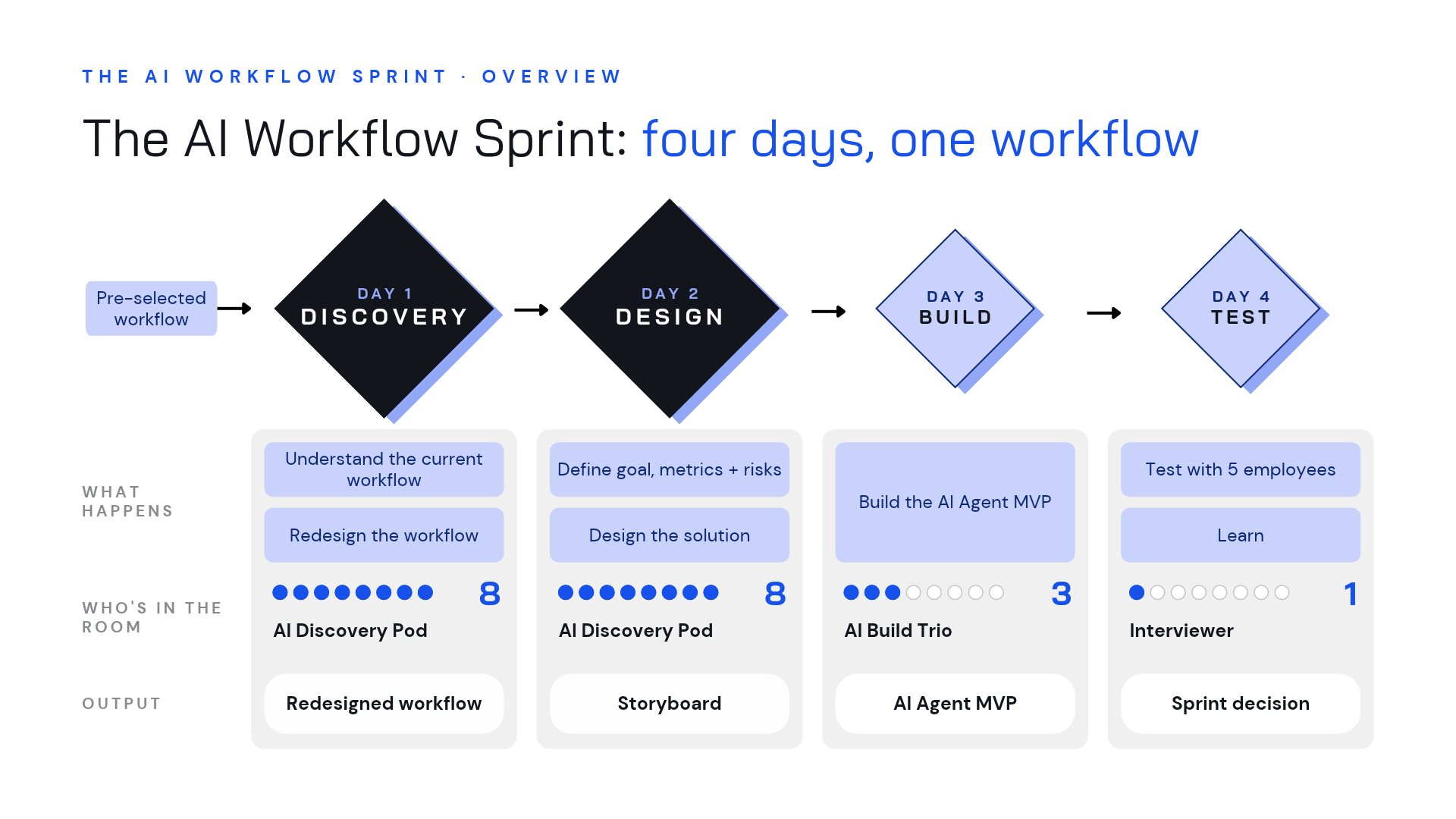
The AI Discovery Pod is a temporary group of around six to eight people assembled for Days 1 and 2.
It includes the employee who does the work—or someone very close to it—alongside people who understand the business, design, AI, data, research, and relevant legal or compliance issues. It also needs a Decider who can make the final call.
How close someone is to the work matters. A person who knows the process only from reports may miss the shortcuts, exceptions, and judgment calls that shape it. Include the employee whose work you’re redesigning wherever possible.
The pod also needs people who will question familiar assumptions. If everyone has lived with the problem for years, the group may dismiss alternatives before giving them a chance.
How does the team change across the four days?
The Discovery Pod works together for the first two days, producing the workflow redesign, solution blueprint, and build plan.
On Day 3, an AI Build Trio takes over: the AI engineer, designer, and subject-matter expert. They’re already part of the pod, so they know why the team chose this design.
The Researcher or Interviewer works alongside them. They contribute during discovery and design, prepare the test tasks and interview script on Day 3, then run the five employee interviews and bring the findings together on Day 4.
The facilitator then brings the pod and Decider back together for the final decision. Everyone’s role and availability are agreed before the sprint begins.
What does the AI Facilitator do?
The facilitator prepares and guides the decision process. They structure activities, manage time, balance participation, and keep decisions, risks, and open questions visible.
They help the experts work together. The team brings the knowledge and makes the judgments about the work.
Individual work before sharing, equal speaking time, timed activities, and voting help the group consider different perspectives. Votes reveal priorities and support discussion. The Decider takes responsibility for the final calls.
An internal facilitator can lead the process when they have the experience and method to manage this kind of work.
What needs to happen before the sprint?
First, confirm what the team is there to work on: which employee, which workflow problem, which business goal, and who in leadership supports it.
Then assemble the pod and book the Build Trio and Interviewer for their later responsibilities. Run a one-hour team onboarding session and a separate one-hour session with the Decider to clarify the process, expected outcomes, and decisions they will need to make.
Prepare the room, materials, facilitation kit, and tools. Check the data, access, and technical conditions needed for a believable prototype and arrange the employee testing.
Bring any useful research, process documents, screenshots, or rough workflow maps you already have. They don’t need to be finished. The team can build the map on Day 1, as long as the people who know the work are there.
This preparation keeps the four days useful. If someone is unavailable or the team can’t access the data on build day, it loses time it needs to make and test the prototype.
How does the four-day AI Workflow Sprint work?
The sprint moves through Discovery, Design, Build, and Test. Each day gives the team what it needs for the next.
Day 1: How does the work happen, and how could it change?
The Decider opens with the initiative’s context: the vision, desired outcomes, and what has already been tried.
The team then creates an Employee Proto-Persona: a shared picture of the person’s responsibilities, pressures, goals, challenges, and readiness for change. It puts the team’s assumptions on the page so people can question and update them.
Next comes the Current Workflow Map. The team maps stages, employee actions, systems and tools, friction points, and places where time, money, capacity, or quality are being lost.
Only after that shared picture exists does the team move to the AI Workflow Redesign Canvas.
What happens in the redesign canvas?
The sequence is deliberate.
First, the team agrees on what each stage needs to achieve for the organization. What result matters here, whatever the current task looks like?
Then it uses the AI Capability Cards to explore where AI could help complete a task, support human judgment, or automate the work. At this point, the team is exploring what’s possible.
Before choosing a redesign, the team discusses how reliably AI could do this work in practice. That helps identify where a person needs to review, judge, or step in. These are estimates to guide the design; reliability still needs testing.
With that shared picture, participants propose new steps: what could be removed, combined, added, or kept? The team compares the options and agrees on a future workflow that connects the outcomes it needs with what AI can do.
Finally, it maps system impact and shifted bottlenecks: what else changes when this workflow changes? If one stage becomes faster, who gets more work? If an employee moves from doing the task to reviewing it, what information and authority will they need? Where might the next bottleneck appear?
Day 1 ends with the employee proto-persona, current workflow map, and redesign canvas. The team has also considered how the new workflow could affect other people and teams.
Day 2: What solution should the team build and test?
The pod starts by defining success at scale. If everyone used this new way of working, what would need to improve?
It agrees on a long-term goal and three success metrics. Depending on the problem, those might concern quality, time, cost, capacity, risk, behavior, or organizational change.
Then the team looks at risks across six areas:
- Data readiness.
- Model and technical capability.
- Integration and architecture.
- Legal, compliance, and security.
- Adoption and human factors.
- Economics and scalability.
The most important risks shape what the team designs and tests. Wider issues that the prototype can’t test are recorded for follow-up.
Each participant sketches a solution showing the situation, the AI output, and the employee’s decision. They can use AI to clarify the sketch and spot missing steps. They decide which suggestions to keep.
The team reviews the sketches through a Heat Map and Speed Critique: a quick way to highlight promising ideas and discuss their strengths and risks. After hearing the team’s reasoning, the Decider chooses what moves forward.
Why is the storyboard more than a sequence of screens?
The Storyboard connects the employee experience to the system needed to support it.
The team agrees on the sequence first, then adds five kinds of detail to each step:
- What the employee sees, says, or does, including real-time inputs.
- What the AI agent does and produces.
- The knowledge, context, or data it needs.
- The tools or systems it uses.
- The guardrails that apply.
It then adds test hypotheses: the questions testing needs to answer about what employees understand, what they trust, and whether they know what to do next.
That gives the Build Trio a shared blueprint and the Interviewer a testing brief.
Day 2 ends with Prototype Planning. The trio confirms its approach, responsibilities, schedule, and scope. The Interviewer confirms the testing plan. Access or data blockers need attention before the team splits.
Day 3: Can the team make the proposed workflow real enough to test?
The Build Trio turns the storyboard into a working AI Agent MVP.
The engineer builds what the agent does and how its actions connect. The designer builds the interface employees will use. The subject-matter expert supplies real examples, checks the AI results, and corrects anything that doesn’t make sense in the work.
The prototype is built for a specific test. The team agrees which parts will work for real and which will be simulated, so everyone knows what the test can tell them.
The facilitator’s role becomes lighter: protect build time, coordinate check-ins, and surface blockers. The trio integrates its work, checks the flow, and completes a walkthrough before testing.
The subject-matter expert must review the AI outputs before testing. Otherwise, employees may spend the session reacting to errors the team could have caught beforehand.
Meanwhile, the Interviewer prepares the script and scenarios around the storyboard hypotheses.
Day 4: What happens when employees use the prototype?
The Interviewer runs five structured sessions with employees who perform the target workflow.
Participants explain their current experience, work through the prototype, and describe what they understand, question, or would need to change.
The testing focuses on three questions:
- Do employees understand the AI output?
- Do they trust it enough to act on it?
- Does the AI-assisted workflow improve their work?
The sessions also test the questions recorded in the storyboard. The team watches where employees hesitate, check an answer themselves, get confused, or make a decision.
Five interviews can show where the approach helps and where people struggle. The team still needs to check whether it works reliably in daily use, whether people keep using it, and what business results it delivers.
How does the team turn interview findings into a decision?
The Interviewer first summarizes each session: what worked, what caused concern, and what it revealed about the questions the team wanted to test.
Next, they compare the sessions and record patterns in a Sprint Validation Scorecard. AI helps transcribe and analyze the interviews. The Interviewer checks the findings and explains what they mean.
The facilitator reconvenes the pod and Decider. Together, they review what worked, what failed, which risks appeared, and what remains uncertain.
The Decider makes the final call and explains the reasoning.
What does “Scale, Iterate, or Stop” mean?
Scale means the findings support moving toward a production build. The organization agrees who owns the next step, the first milestone, and what technical and operational work is still needed.
Iterate means the concept remains promising, but specific issues need to be redesigned and tested again. The decision should identify those issues and the next test.
Stop means the evidence does not support further investment in the proposed workflow.
Each decision should lead to a clear next step. Record the choice, the evidence behind it, and who will do what next. That helps the work continue after the workshop.
What does the team leave with?
The team leaves with:
✅ An employee proto-persona and current workflow map.
✅ A redesigned workflow with AI capabilities, reliability considerations, human responsibilities, and anticipated system impacts.
✅ A long-term goal, three success metrics, and prioritized risks.
✅ A storyboard with employee interactions, agent behavior, knowledge, tools, guardrails, and test hypotheses.
✅ A build plan and working AI Agent MVP with SME-reviewed outputs.
✅ Employee interview findings and a Sprint Validation Scorecard.
✅ A documented Scale, Iterate, or Stop decision and next actions.
These outputs explain why the team made its decision and what it needs before investing further. They also keep the unanswered questions visible.
How do you get started?
There are three ways to get started, depending on whether you want the materials, hands-on practice, or training for your team.
1. Get the kit and run the method
If you already facilitate workshops and want to understand the AI Workflow Sprint well enough to run it, start with the AI Workflow Sprint Kit.
The playbook explains each activity and why it matters. The facilitation slides, agendas, worksheets, and AI Capability Cards help you prepare and guide the team through the process.
Get the AI Workflow Sprint Kit →
2. Build your practice in Berlin
If you want to get more comfortable leading these exercises, join the AI Facilitator Training in Berlin and learn by doing.
Over three days, you work through AI Problem Framing and the AI Workflow Sprint in a small group. You practice the methods, get live coaching, and experience the decisions involved before bringing them to your own teams or clients.
Join AI Facilitator Training in Berlin →
3. Train the people who will lead this across your business units
Do you have a team of AI Champions, AI Transformation Leads, or AI Enablement Leads who need to run these sessions with their business units?
Our corporate AI Facilitation Training teaches them to guide teams through AI Problem Framing and the AI Workflow Sprint. They learn and practice together using challenges and workflows from your organization, so they can apply the methods to the work they’ll be leading.

.png)